Chrome Extension: Country of Origin Toast
About the Extension
This post is about the development of a Chrome extension called “Made Origin”. This extension shows a small toast notification about the Country of Origin of a product when you visit apparel websites like Myntra, Uniqlo, H&M, etc. Usually, the Country of Origin is not easily visible on the product page and takes multiple clicks to find. This extension makes it easier for users to find this information.
Development Process
Initial Prompt to Claude
I have an idea of a chrome extension:
When I visit any apparel site like myntra, uniqlo, h&m it is tough to find the Country of Origin / Manufactured country of a product. Its usually hidden under some panel which the user has to look out for and click it.

My idea is simple, whenever I open a product on any of these sites, I should see the country as a simple toast on the top right of the site page with country name and flag. A simple thing but it should be easily visible.
The prompt above gave me a basic structure for the extension, which I then refined and developed further.
Working on the Extension with VSCODE Copilot
The initial code generated by Claude was a good starting point. But when I tried to load the extension in Chrome, it didn’t work as expected. So it was time to first understand the code at a high level and work with Copilot to make it function correctly.
Help me analyse this Chrome extension with an example and a step-by-step approach
The prompt above helped me understand the code and how it works.
So I started with Myntra products first. I inspected the product page on Myntra to see where the country-of-origin information is stored and what the manual process was to find it, such as scrolling down and clicking on View Supplier Information.
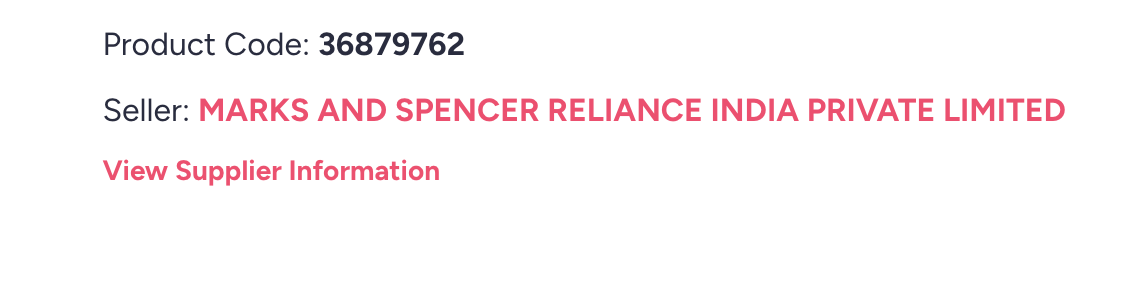
This opened a modal which had the country of origin information. So I had to make the extension do the same thing, click on the button and then extract the country information from the modal.
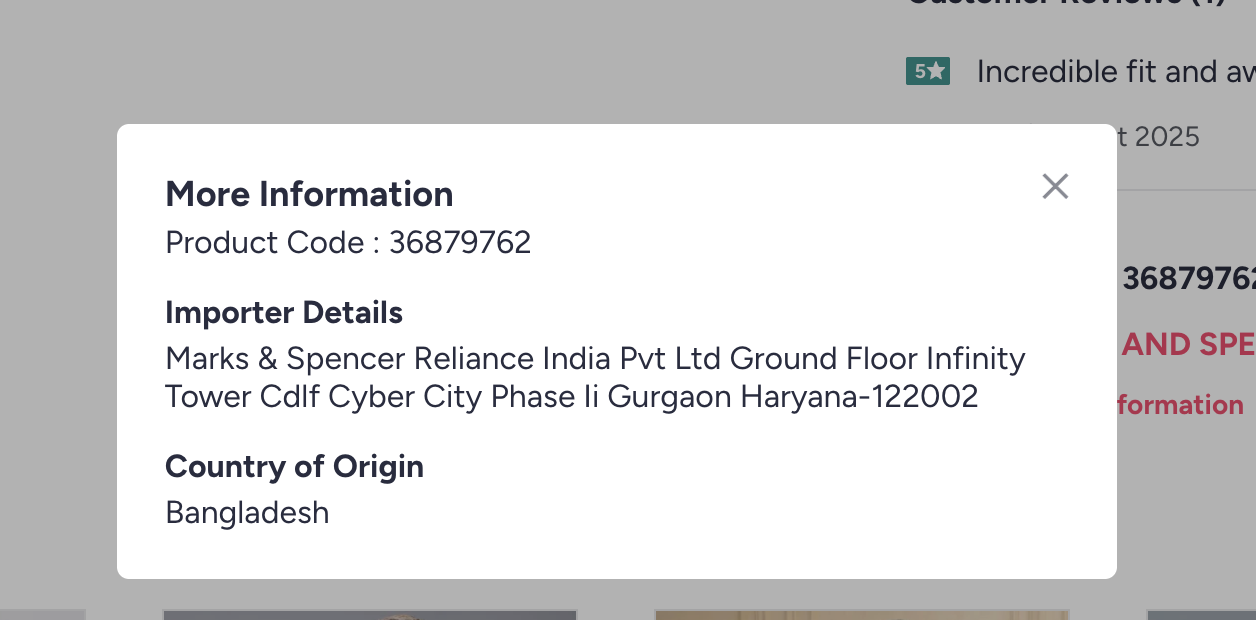
Based on this, I found the div selector that contained the country information and passed it to Copilot as:
For myntra its not working.
The Country of Origin comes up as a <div class="Modal-modalContent"><div class="Modal-modalDialog"><div class="details-details"><span class="myntraweb-sprite Address-close-button sprites-remove"></span><div><h3>More Information</h3><p>Product Code : 36879762</p></div><ul><li><h4>Importer Details</h4><p>Marks & Spencer Reliance India Pvt Ltd Ground Floor Infinity Tower Cdlf Cyber City Phase Ii Gurgaon Haryana-122002</p></li><li><h4>Country of Origin</h4><p>Bangladesh</p></li></ul></div></div></div>

When we click on this div: class="supplier-viewmore-link" having text: View Supplier Information

#mountRoot > div > div:nth-child(1) > main > div.pdp-details.common-clearfix > div.pdp-description-container > div.undefined.supplier-desktopCodeSupplier > div:nth-child(2) > div
Now, when opening a product page on Myntra, the extension clicked the View Supplier Information button, extracted the country information from the modal, and showed it as a toast notification on the top right of the page.
But the issue here was that the modal opened, which was a bit annoying for the user. All of this had to happen in the background without opening the modal, so I had to find a way to extract the country information without showing it.
So this was the next prompt:
Okay, now it works, but the modal opens in the UI, which is a bad user experience. Is there any way to do it in the background?
Gist of the solution:
The supplier link is still clicked programmatically, but:
addMyntraModalStealthStyle() temporarily hides the modal (opacity: 0, no pointer events) while it’s open, so users should not see it.

openMyntraCountryModalIfNeeded() now:
Clicks the link once, waits ~900 ms, scans modal content via scanElements(getCurrentHostSelectors()), and returns the detected country.

Then calls closeMyntraModalIfOpen() to close/remove the modal and removeMyntraModalStealthStyle() to restore normal styles.

The run() function:
If initial selector scan finds nothing on Myntra, it calls this new “stealth” modal flow and uses the returned country.
This made it work as expected without opening the modal in the UI.
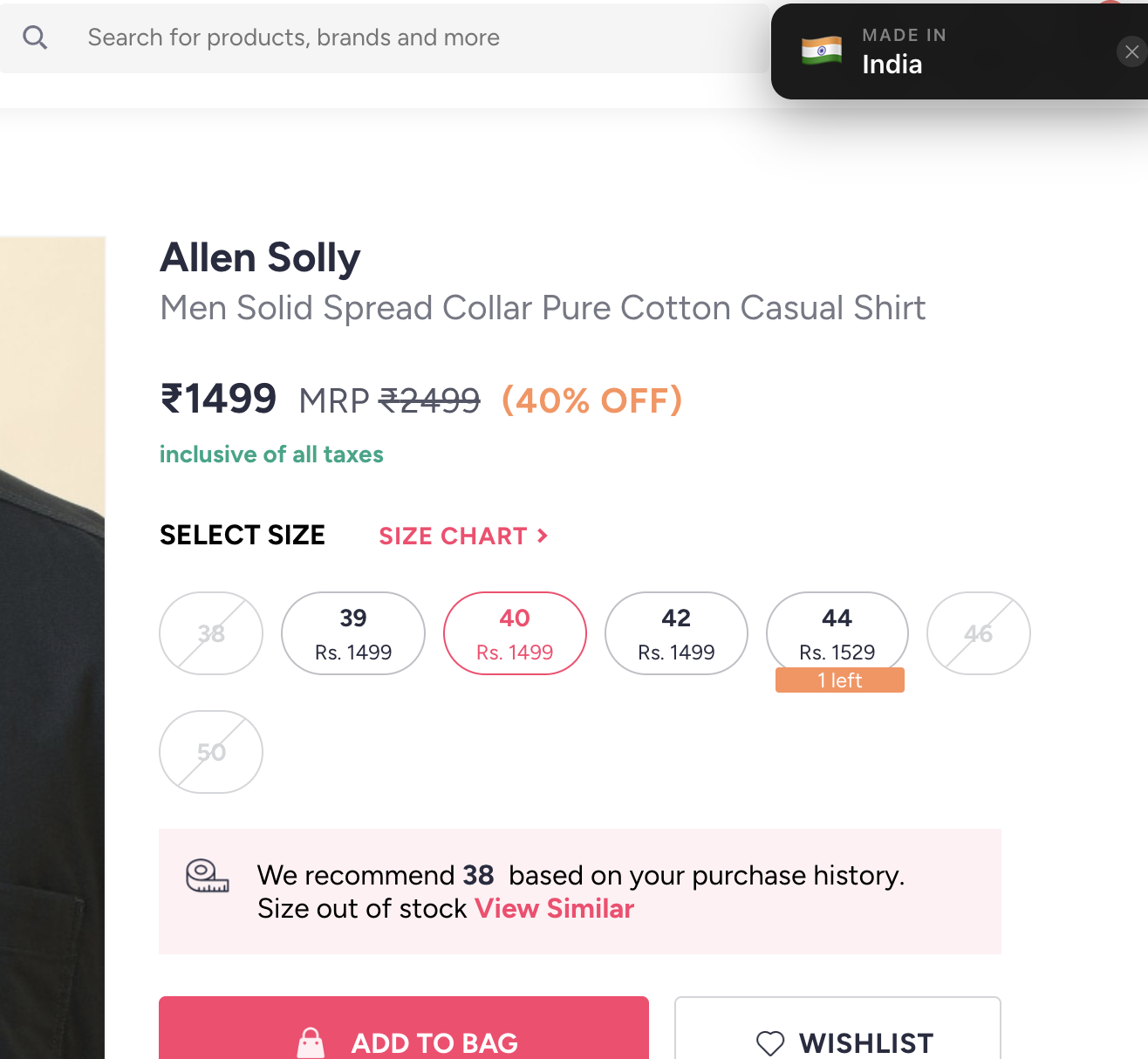
While trying it in the UI, I found a case where, if the product size is not selected, the supplier information is not available.
Here was the prompt to fix it:
One behavior I observed is that when I open a product and have not selected a size, the supplier information is not present.

So now only trigger the flow when a size is selected from this div: #sizeButtonsContainer > div.size-buttons-size-buttons
Then trigger our flow to find the country of origin, rather than triggering it as soon as the page opens.
This made the extension work only after a product size is selected, and then it shows the country of origin as a toast notification on the top right of the page.
The next step is to optimize it for other sites.
Summary
Overall, getting started with boilerplate code from Claude and then using Copilot to understand and refine the code was a good experience. Obviously, you need to be specific with your prompts to get the desired output.
An idea turned into a product quickly with the help of AI tools. I hope this guide will be helpful for others who want to build similar extensions or products using AI tools.