<?xml version="1.0" encoding="utf-8"?><feed xmlns="http://www.w3.org/2005/Atom" ><generator uri="https://jekyllrb.com/" version="3.10.0">Jekyll</generator><link href="https://shrikantj.dev/feed.xml" rel="self" type="application/atom+xml" /><link href="https://shrikantj.dev/" rel="alternate" type="text/html" /><updated>2026-05-01T14:30:07+00:00</updated><id>https://shrikantj.dev/feed.xml</id><title type="html">Shrikant’s Kriti-Sangraha</title><subtitle>A personal repository of works, reflecting a journey of constant creation.</subtitle><entry><title type="html">Pre-warming Container Images on Upgraded Nodes with Kubernetes CronJob + DaemonSet</title><link href="https://shrikantj.dev/2026/04/15/image-prewarm.html" rel="alternate" type="text/html" title="Pre-warming Container Images on Upgraded Nodes with Kubernetes CronJob + DaemonSet" /><published>2026-04-15T18:30:00+00:00</published><updated>2026-04-15T18:30:00+00:00</updated><id>https://shrikantj.dev/2026/04/15/image-prewarm</id><content type="html" xml:base="https://shrikantj.dev/2026/04/15/image-prewarm.html"><![CDATA[<!--

## The Problem

On our hosted notebook platform, when a node undergoes an OS upgrade, it rejoins
the cluster with a fresh slate — no cached container images. The first user pod
scheduled on that node pays the full image pull penalty for the base image,
leading to slow startup times and a degraded experience.

We needed a way to guarantee that upgraded nodes have the base image pre-warmed
*before* any user workload lands on them.

## Why Not Just Let It Pull?

Our base images are large. A cold pull on a freshly upgraded node adds significant
latency to the first notebook spawn. In a platform where users expect near-instant
startup, that delay is noticeable. The image needs to be ready *before* the node
is open for scheduling.

## The Approach: Taint, Upgrade, Pre-warm, Untaint

We broke the problem into two Kubernetes primitives working in concert — a CronJob
as the orchestrator and a DaemonSet as the per-node executor.

### Flow

<p align="center">
  <img src="/assets/images/flow-diagram-1.png" alt="Flow Diagram" />
</p>


### Sequence

<p align="center">
  <img src="/assets/images/sequence-diagram.png" alt="Sequence of Steps for upgrade" />
</p>

## Component 1: The CronJob — Orchestrator

A CronJob runs every hour and executes a Python script with two responsibilities.

**Part 1 — Taint & Label**

Fetches all active node maintenance objects for the notebook pool. For each node,
it applies:

- **Label:** `os-upgrade/status=upgrading`
- **Taint:** `os-upgrade=true:NoSchedule`

The taint prevents any user pods from landing on the node. The label acts as a
targeting signal for the DaemonSet.

```yaml
apiVersion: batch/v1
kind: CronJob
metadata:
name: os-upgrade-orchestrator
namespace: notebooks
spec:
schedule: "0 * * * *"
jobTemplate:
    spec:
    backoffLimit: 2
    ttlSecondsAfterFinished: 30
    template:
        spec:
        restartPolicy: OnFailure
        serviceAccountName: upgrade-sa
        containers:
            - name: orchestrator
            image: my-registry/image-prewarmer:latest
            command: ["/bin/sh", "-c", "python3 /scripts/orchestrate.py"]
            volumeMounts:
                - name: script
                mountPath: /scripts/orchestrate.py
                subPath: orchestrate.py
        volumes:
            - name: script
            configMap:
                name: upgrade-orchestrator-script
```

**Part 2 — Detect & Release**

On each run, the script also checks for nodes that have *already* been upgraded
(by reading the kernel version label) AND have a Running DaemonSet pod. That
intersection represents nodes where the upgrade is complete and the image is warm.
For those nodes, the script removes the taint and label.

```python
upgraded_nodes = fetch_upgraded_nodes()
nodes_with_running_ds_pod = fetch_running_daemonset_pods()

ready_nodes = set(upgraded_nodes) & set(nodes_with_running_ds_pod)
for node in ready_nodes:
    remove_label_and_taint(node)
```

## Component 2: The DaemonSet — Image Pre-warmer

A DaemonSet with tight node affinity targets only nodes satisfying **all three**
conditions:

1. **Upgraded kernel** — e.g. `kernel-version.full = 5.15.173.1`
2. **Notebook pool** — e.g. `node-pool = notebooks`
3. **Upgrade in progress** — `os-upgrade/status = upgrading`

```yaml
apiVersion: apps/v1
kind: DaemonSet
metadata:
name: image-prewarmer
namespace: notebooks
spec:
selector:
    matchLabels:
    app: image-prewarmer
template:
    metadata:
    labels:
        app: image-prewarmer
    spec:
    tolerations:
        - key: "os-upgrade"
        operator: "Equal"
        value: "true"
        effect: "NoSchedule"
    affinity:
        nodeAffinity:
        requiredDuringSchedulingIgnoredDuringExecution:
            nodeSelectorTerms:
            - matchExpressions:
                - key: node.kubernetes.io/kernel-version
                    operator: In
                    values: ["5.15.173.1"]
                - key: node-pool
                    operator: In
                    values: ["notebooks"]
                - key: os-upgrade/status
                    operator: In
                    values: ["upgrading"]
    containers:
        - name: warmer
        image: my-registry/notebook-base:latest
        resources:
            requests:
            memory: "100Mi"
            limits:
            memory: "200Mi"
        command: ['sh', '-c', 'echo "Image pulled — pre-warm complete" && sleep 3600']
```

Key design choices:

- The DaemonSet **tolerates** the `os-upgrade` taint — it can schedule where user
pods cannot
- The container image **is the actual base image** we want cached — pulling it *is*
the pre-warming
- The container just sleeps — its only job is to trigger the pull and serve as a
ready signal for the CronJob

## Node Lifecycle Through an Upgrade

<p align="center">
  <img src="/assets/images/node-lifecycle.png" alt="Node Lifecycle Through an Upgrade" />
</p>

## Why This Works Well

- **Self-healing.** The CronJob continuously reconciles. If a node is missed in one
cycle, it gets picked up in the next.
- **No user impact.** The taint guarantees no user pod hits a cold node. The node only
becomes schedulable after the image is confirmed cached.
- **Native K8s primitives.** DaemonSets naturally handle "run exactly one pod per
matching node." No custom controller needed — just the right combination of
labels, taints, and affinity rules.
- **Decoupled from the upgrade pipeline.** We don't modify the OS upgrade process.
We observe its side effects (kernel version label change) and react.

## Takeaway

Sometimes you don't need a custom operator. A CronJob for orchestration + a
DaemonSet for per-node work, connected through labels and taints, gave us a
reliable image pre-warming pipeline with about 200 lines of Python and 90 lines
of YAML. -->

<h2 id="the-problem">The Problem</h2>

<p>On our hosted notebook platform, when a node undergoes an OS upgrade, it rejoins
the cluster with a fresh slate — no cached container images. The first user pod
scheduled on that node pays the full image pull penalty for the base image,
leading to slow startup times and a degraded experience.</p>

<p>We needed a way to guarantee that upgraded nodes have the base image pre-warmed
<em>before</em> any user workload lands on them.</p>

<h2 id="why-not-just-let-it-pull">Why Not Just Let It Pull?</h2>

<p>Our base images are large. A cold pull on a freshly upgraded node adds significant
latency to the first notebook spawn. In a platform where users expect near-instant
startup, that delay is noticeable. The image needs to be ready <em>before</em> the node
is open for scheduling.</p>

<h2 id="the-alternative-a-custom-controller">The Alternative: A Custom Controller</h2>

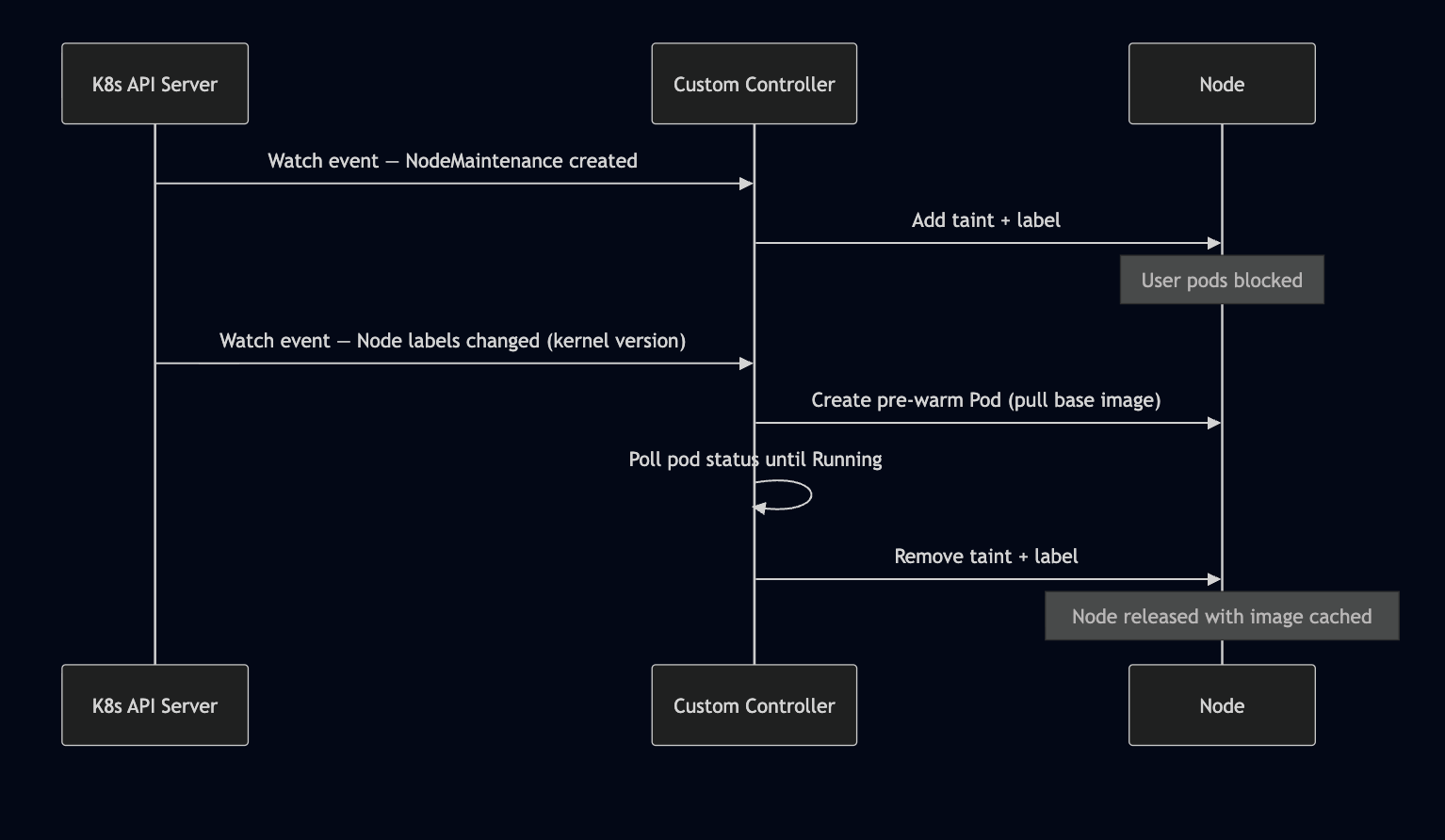
<p>The textbook Kubernetes answer would be a custom controller (operator) that watches
node events and reacts in real-time.</p>

<h3 id="how-it-would-work">How It Would Work</h3>

<p align="center">
  <img src="/assets/images/intial-diagram.png" alt="Sequence of Steps for upgrade" />
</p>

<p>The controller would use the watch/reconcile pattern — subscribe to node events via
the K8s API, react to label changes in near real-time, and manage the full lifecycle
in a single reconciliation loop.</p>

<h3 id="why-we-didnt-go-this-route">Why We Didn’t Go This Route</h3>

<table>
  <thead>
    <tr>
      <th>Concern</th>
      <th>Custom Controller</th>
      <th>CronJob + DaemonSet</th>
    </tr>
  </thead>
  <tbody>
    <tr>
      <td><strong>React time</strong></td>
      <td>Seconds (event-driven)</td>
      <td>Up to 1 hour (poll-based)</td>
    </tr>
    <tr>
      <td><strong>Complexity</strong></td>
      <td>Custom CRD, RBAC, leader election, error handling</td>
      <td>Two standard K8s resources + a script</td>
    </tr>
    <tr>
      <td><strong>Maintenance</strong></td>
      <td>Dedicated codebase, CI/CD, versioning</td>
      <td>ConfigMap with a Python script</td>
    </tr>
    <tr>
      <td><strong>Failure mode</strong></td>
      <td>Controller crash = no nodes processed</td>
      <td>Missed cycle = next run catches up</td>
    </tr>
    <tr>
      <td><strong>Deployment</strong></td>
      <td>Needs a long-running Deployment with HA</td>
      <td>CronJob is fire-and-forget</td>
    </tr>
    <tr>
      <td><strong>Development time</strong></td>
      <td>Weeks (with testing, CRD design)</td>
      <td>Days</td>
    </tr>
  </tbody>
</table>

<p>For our use case — a batch of nodes upgrading over hours, not minutes — the
near-instant reaction time of a controller wasn’t worth the operational overhead.
The CronJob’s hourly poll is fast enough, and the DaemonSet gives us the per-node
execution for free.</p>

<p>A custom controller becomes the right choice when you need sub-second reaction
times, complex state machines, or this pattern extends to many different
reconciliation workflows.</p>

<h2 id="our-approach-taint-upgrade-pre-warm-untaint">Our Approach: Taint, Upgrade, Pre-warm, Untaint</h2>

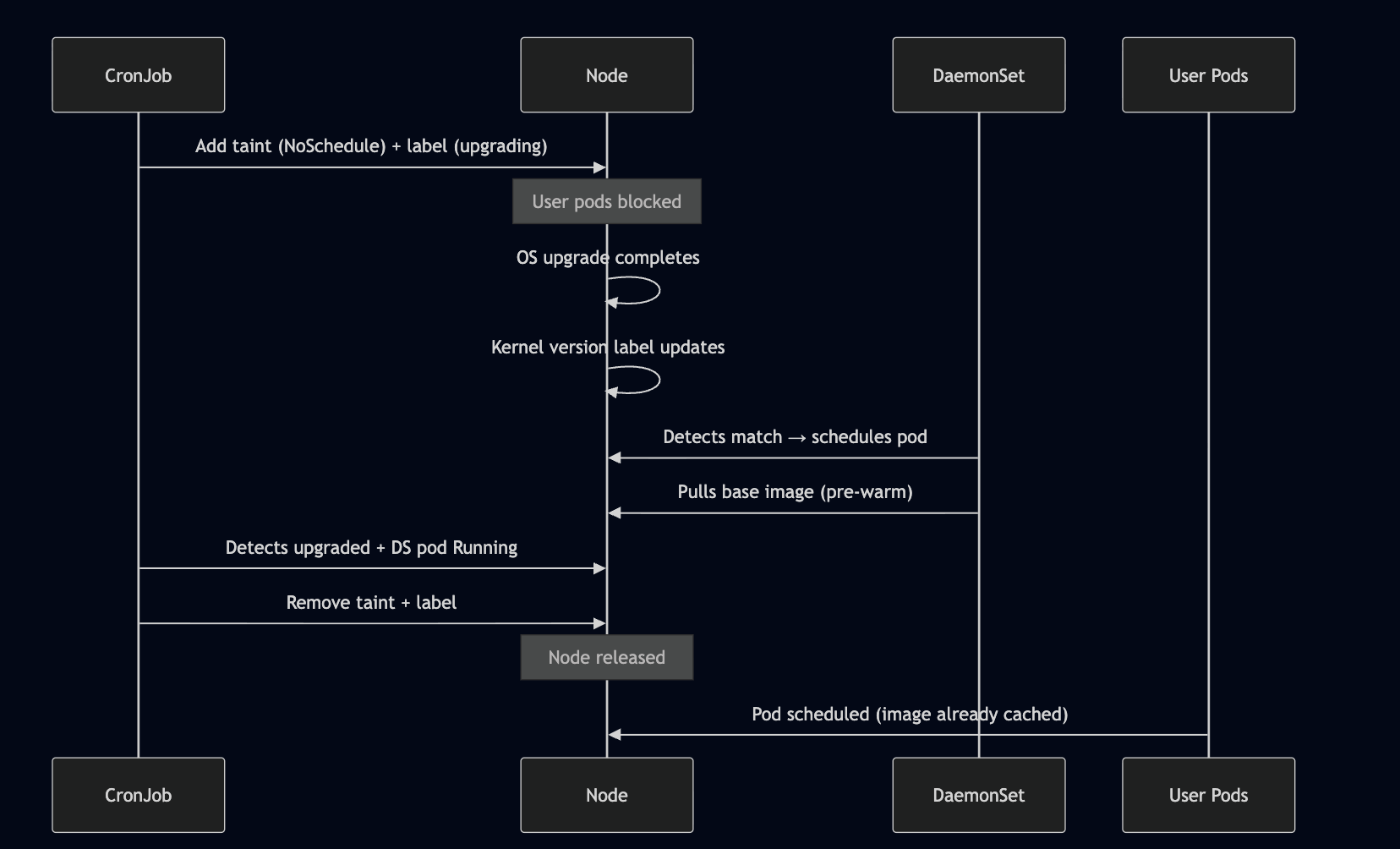
<p>We broke the problem into two standard Kubernetes primitives working in concert —
a CronJob as the orchestrator and a DaemonSet as the per-node executor.</p>

<p align="center">
  <img src="/assets/images/sequence-diagram.png" alt="Sequence of Steps for upgrade" />
</p>

<h2 id="component-1-the-cronjob--orchestrator">Component 1: The CronJob — Orchestrator</h2>

<p>A CronJob runs every hour and executes a Python script with two responsibilities.</p>

<p><strong>Part 1 — Taint &amp; Label</strong></p>

<p>Fetches all active node maintenance objects for the notebook pool. For each node,
it applies:</p>

<ul>
  <li><strong>Label:</strong> <code class="language-plaintext highlighter-rouge">os-upgrade/status=upgrading</code></li>
  <li><strong>Taint:</strong> <code class="language-plaintext highlighter-rouge">os-upgrade=true:NoSchedule</code></li>
</ul>

<p>The taint prevents any user pods from landing on the node. The label acts as a
targeting signal for the DaemonSet.</p>

<div class="language-yaml highlighter-rouge"><div class="highlight"><pre class="highlight"><code><span class="na">apiVersion</span><span class="pi">:</span> <span class="s">batch/v1</span>
<span class="na">kind</span><span class="pi">:</span> <span class="s">CronJob</span>
<span class="na">metadata</span><span class="pi">:</span>
<span class="na">name</span><span class="pi">:</span> <span class="s">os-upgrade-orchestrator</span>
<span class="na">namespace</span><span class="pi">:</span> <span class="s">notebooks</span>
<span class="na">spec</span><span class="pi">:</span>
<span class="na">schedule</span><span class="pi">:</span> <span class="s2">"</span><span class="s">0</span><span class="nv"> </span><span class="s">*</span><span class="nv"> </span><span class="s">*</span><span class="nv"> </span><span class="s">*</span><span class="nv"> </span><span class="s">*"</span>
<span class="na">jobTemplate</span><span class="pi">:</span>
    <span class="na">spec</span><span class="pi">:</span>
    <span class="na">backoffLimit</span><span class="pi">:</span> <span class="m">2</span>
    <span class="na">ttlSecondsAfterFinished</span><span class="pi">:</span> <span class="m">30</span>
    <span class="na">template</span><span class="pi">:</span>
        <span class="na">spec</span><span class="pi">:</span>
        <span class="na">restartPolicy</span><span class="pi">:</span> <span class="s">OnFailure</span>
        <span class="na">serviceAccountName</span><span class="pi">:</span> <span class="s">upgrade-sa</span>
        <span class="na">containers</span><span class="pi">:</span>
            <span class="pi">-</span> <span class="na">name</span><span class="pi">:</span> <span class="s">orchestrator</span>
            <span class="na">image</span><span class="pi">:</span> <span class="s">my-registry/image-prewarmer:latest</span>
            <span class="na">command</span><span class="pi">:</span> <span class="pi">[</span><span class="s2">"</span><span class="s">/bin/sh"</span><span class="pi">,</span> <span class="s2">"</span><span class="s">-c"</span><span class="pi">,</span> <span class="s2">"</span><span class="s">python3</span><span class="nv"> </span><span class="s">/scripts/orchestrate.py"</span><span class="pi">]</span>
            <span class="na">volumeMounts</span><span class="pi">:</span>
                <span class="pi">-</span> <span class="na">name</span><span class="pi">:</span> <span class="s">script</span>
                <span class="na">mountPath</span><span class="pi">:</span> <span class="s">/scripts/orchestrate.py</span>
                <span class="na">subPath</span><span class="pi">:</span> <span class="s">orchestrate.py</span>
        <span class="na">volumes</span><span class="pi">:</span>
            <span class="pi">-</span> <span class="na">name</span><span class="pi">:</span> <span class="s">script</span>
            <span class="na">configMap</span><span class="pi">:</span>
                <span class="na">name</span><span class="pi">:</span> <span class="s">upgrade-orchestrator-script</span>
</code></pre></div></div>

<p><strong>Part 2 — Detect &amp; Release</strong></p>

<p>On each run, the script also checks for nodes that have <em>already</em> been upgraded
(by reading the kernel version label) AND have a Running DaemonSet pod. That
intersection represents nodes where the upgrade is complete and the image is warm.
For those nodes, the script removes the taint and label.</p>

<div class="language-python highlighter-rouge"><div class="highlight"><pre class="highlight"><code><span class="n">upgraded_nodes</span> <span class="o">=</span> <span class="n">fetch_upgraded_nodes</span><span class="p">()</span>
<span class="n">nodes_with_running_ds_pod</span> <span class="o">=</span> <span class="n">fetch_running_daemonset_pods</span><span class="p">()</span>

<span class="n">ready_nodes</span> <span class="o">=</span> <span class="nb">set</span><span class="p">(</span><span class="n">upgraded_nodes</span><span class="p">)</span> <span class="o">&amp;</span> <span class="nb">set</span><span class="p">(</span><span class="n">nodes_with_running_ds_pod</span><span class="p">)</span>
<span class="k">for</span> <span class="n">node</span> <span class="ow">in</span> <span class="n">ready_nodes</span><span class="p">:</span>
    <span class="n">remove_label_and_taint</span><span class="p">(</span><span class="n">node</span><span class="p">)</span>
</code></pre></div></div>

<h2 id="component-2-the-daemonset--image-pre-warmer">Component 2: The DaemonSet — Image Pre-warmer</h2>

<p>A DaemonSet with tight node affinity targets only nodes satisfying <strong>all three</strong>
conditions:</p>

<ol>
  <li><strong>Upgraded kernel</strong> — e.g. <code class="language-plaintext highlighter-rouge">kernel-version.full = 5.15.173.1</code></li>
  <li><strong>Notebook pool</strong> — e.g. <code class="language-plaintext highlighter-rouge">node-pool = notebooks</code></li>
  <li><strong>Upgrade in progress</strong> — <code class="language-plaintext highlighter-rouge">os-upgrade/status = upgrading</code></li>
</ol>

<div class="language-yaml highlighter-rouge"><div class="highlight"><pre class="highlight"><code><span class="na">apiVersion</span><span class="pi">:</span> <span class="s">apps/v1</span>
<span class="na">kind</span><span class="pi">:</span> <span class="s">DaemonSet</span>
<span class="na">metadata</span><span class="pi">:</span>
<span class="na">name</span><span class="pi">:</span> <span class="s">image-prewarmer</span>
<span class="na">namespace</span><span class="pi">:</span> <span class="s">notebooks</span>
<span class="na">spec</span><span class="pi">:</span>
<span class="na">selector</span><span class="pi">:</span>
    <span class="na">matchLabels</span><span class="pi">:</span>
    <span class="na">app</span><span class="pi">:</span> <span class="s">image-prewarmer</span>
<span class="na">template</span><span class="pi">:</span>
    <span class="na">metadata</span><span class="pi">:</span>
    <span class="na">labels</span><span class="pi">:</span>
        <span class="na">app</span><span class="pi">:</span> <span class="s">image-prewarmer</span>
    <span class="na">spec</span><span class="pi">:</span>
    <span class="na">tolerations</span><span class="pi">:</span>
        <span class="pi">-</span> <span class="na">key</span><span class="pi">:</span> <span class="s2">"</span><span class="s">os-upgrade"</span>
        <span class="na">operator</span><span class="pi">:</span> <span class="s2">"</span><span class="s">Equal"</span>
        <span class="na">value</span><span class="pi">:</span> <span class="s2">"</span><span class="s">true"</span>
        <span class="na">effect</span><span class="pi">:</span> <span class="s2">"</span><span class="s">NoSchedule"</span>
    <span class="na">affinity</span><span class="pi">:</span>
        <span class="na">nodeAffinity</span><span class="pi">:</span>
        <span class="na">requiredDuringSchedulingIgnoredDuringExecution</span><span class="pi">:</span>
            <span class="na">nodeSelectorTerms</span><span class="pi">:</span>
            <span class="pi">-</span> <span class="na">matchExpressions</span><span class="pi">:</span>
                <span class="pi">-</span> <span class="na">key</span><span class="pi">:</span> <span class="s">node.kubernetes.io/kernel-version</span>
                    <span class="s">operator</span><span class="err">:</span> <span class="s">In</span>
                    <span class="s">values</span><span class="err">:</span> <span class="pi">[</span><span class="s2">"</span><span class="s">5.15.173.1"</span><span class="pi">]</span>
                <span class="pi">-</span> <span class="na">key</span><span class="pi">:</span> <span class="s">node-pool</span>
                    <span class="s">operator</span><span class="err">:</span> <span class="s">In</span>
                    <span class="s">values</span><span class="err">:</span> <span class="pi">[</span><span class="s2">"</span><span class="s">notebooks"</span><span class="pi">]</span>
                <span class="pi">-</span> <span class="na">key</span><span class="pi">:</span> <span class="s">os-upgrade/status</span>
                    <span class="s">operator</span><span class="err">:</span> <span class="s">In</span>
                    <span class="s">values</span><span class="err">:</span> <span class="pi">[</span><span class="s2">"</span><span class="s">upgrading"</span><span class="pi">]</span>
    <span class="na">containers</span><span class="pi">:</span>
        <span class="pi">-</span> <span class="na">name</span><span class="pi">:</span> <span class="s">warmer</span>
        <span class="na">image</span><span class="pi">:</span> <span class="s">my-registry/notebook-base:latest</span>
        <span class="na">resources</span><span class="pi">:</span>
            <span class="na">requests</span><span class="pi">:</span>
            <span class="na">memory</span><span class="pi">:</span> <span class="s2">"</span><span class="s">100Mi"</span>
            <span class="na">limits</span><span class="pi">:</span>
            <span class="na">memory</span><span class="pi">:</span> <span class="s2">"</span><span class="s">200Mi"</span>
        <span class="na">command</span><span class="pi">:</span> <span class="pi">[</span><span class="s1">'</span><span class="s">sh'</span><span class="pi">,</span> <span class="s1">'</span><span class="s">-c'</span><span class="pi">,</span> <span class="s1">'</span><span class="s">echo</span><span class="nv"> </span><span class="s">"Image</span><span class="nv"> </span><span class="s">pulled</span><span class="nv"> </span><span class="s">—</span><span class="nv"> </span><span class="s">pre-warm</span><span class="nv"> </span><span class="s">complete"</span><span class="nv"> </span><span class="s">&amp;&amp;</span><span class="nv"> </span><span class="s">sleep</span><span class="nv"> </span><span class="s">3600'</span><span class="pi">]</span>
</code></pre></div></div>

<p>Key design choices:</p>

<ul>
  <li>The DaemonSet <strong>tolerates</strong> the <code class="language-plaintext highlighter-rouge">os-upgrade</code> taint — it can schedule where user
pods cannot</li>
  <li>The container image <strong>is the actual base image</strong> we want cached — pulling it <em>is</em>
the pre-warming</li>
  <li>The container just sleeps — its only job is to trigger the pull and serve as a
ready signal for the CronJob</li>
</ul>

<h2 id="node-lifecycle-through-an-upgrade">Node Lifecycle Through an Upgrade</h2>

<p align="center">
  <img src="/assets/images/sequence-diagram.png" alt="Sequence of Steps for upgrade" />
</p>

<h2 id="why-this-works-well">Why This Works Well</h2>

<ul>
  <li><strong>Self-healing.</strong> The CronJob continuously reconciles. If a node is missed in one
cycle, it gets picked up in the next.</li>
  <li><strong>No user impact.</strong> The taint guarantees no user pod hits a cold node. The node only
becomes schedulable after the image is confirmed cached.</li>
  <li><strong>Native K8s primitives.</strong> DaemonSets naturally handle “run exactly one pod per
matching node.” No custom controller needed — just the right combination of
labels, taints, and affinity rules.</li>
  <li><strong>Decoupled from the upgrade pipeline.</strong> We don’t modify the OS upgrade process.
We observe its side effects (kernel version label change) and react.</li>
</ul>

<h2 id="takeaway">Takeaway</h2>

<p>Sometimes you don’t need a custom operator. A CronJob for orchestration + a
DaemonSet for per-node work, connected through labels and taints, gave us a
reliable image pre-warming pipeline with about 200 lines of Python and 90 lines
of YAML. The custom controller path would have given us faster reaction times, but
for a process that plays out over hours, polling every hour is more than adequate —
and dramatically simpler to build, deploy, and maintain.</p>]]></content><author><name></name></author><summary type="html"><![CDATA[&lt;!–]]></summary></entry><entry><title type="html">Claude Code Plugin: AI-Native Flink Pipeline Orchestration</title><link href="https://shrikantj.dev/2026/04/10/claude-plugin.html" rel="alternate" type="text/html" title="Claude Code Plugin: AI-Native Flink Pipeline Orchestration" /><published>2026-04-10T18:30:00+00:00</published><updated>2026-04-10T18:30:00+00:00</updated><id>https://shrikantj.dev/2026/04/10/claude-plugin</id><content type="html" xml:base="https://shrikantj.dev/2026/04/10/claude-plugin.html"><![CDATA[<p>Creating a Flink pipeline at work used to take hours. Not because Flink is hard.
Because you had to navigate 6-8 steps across JupyterLab, terminal, wiki docs,
access control portals, and schema registry. In the right order.
Any wrong step meant oncall.</p>

<p>I automated it with an agent. Full workflow now completes in under 10 minutes.
Zero oncall escalations for this class of issue since.</p>

<p>Here’s how it works and what made it actually hard to build.</p>

<h2 id="the-problem">The Problem</h2>

<p>Engineers relied on a wiki doc to get through each pipeline creation step.
Context-switching between the JupyterLab UI, terminal, access control portals,
and metadata catalogs. Build failures, stale clusters, and access control
misconfigurations routinely required escalation. Median time to a working
pipeline: hours.</p>

<p>The manual steps weren’t the real problem. The failure handling was.
Every step had a different failure mode. None of them had a standard fix.
That’s what made this interesting to build.</p>

<h2 id="how-its-built">How It’s Built</h2>

<p>A Claude Code plugin with 11 composable skills. Built in Python on top of
Jupyter kernel internals and IPython magic commands so it runs natively
inside the same environment engineers already work in. No new tooling, no
platform changes.</p>

<p>Each skill is backed by a purpose-built CLI that talks directly to platform
APIs: Flink SQL gateway, access control services, schema registry, kernel
sessions. The skills are independent you can run the full workflow or just
one step.</p>

<p>But the CLI layer is the easy part.</p>

<h2 id="the-failure-recovery-layer">The Failure Recovery Layer</h2>

<p>This is what separates it from a CLI wrapper.</p>

<pre><code class="language-mermaid">flowchart TD
      A([▶ Skill step executes]):::start --&gt; B[Agent reads full log output]
      B --&gt; C{Success?}

      C -- Yes --&gt; D{More steps?}
      D -- Yes --&gt; A
      D -- No --&gt; Z([✓ Session complete\nAudit trail generated]):::done

      C -- No --&gt; E[Classify error]

      E --&gt; F1[Build failure\nParse Gradle error, fix build config]
      E --&gt; F2[Cluster recycled\nReprovision automatically]
      E --&gt; F3[Pod OOM or crash\nFetch K8s logs, diagnose, apply fix]
      E --&gt; F4[Access control block\nSurface approval URL, wait]
      E --&gt; F5[DDL placeholder mismatch\nValidate against config, flag proactively]

      F1 &amp; F2 &amp; F3 --&gt; R([Rerun step])
      F4 --&gt; W[Engineer approves] --&gt; R
      F5 --&gt; W2[Engineer reviews] --&gt; R

      R --&gt; B

      classDef start fill:#2d6a4f,color:#fff,stroke:#1b4332
      classDef done fill:#1d3557,color:#fff,stroke:#0d2137
</code></pre>
<p>After every skill step, a reasoning layer reads the full log output and decides
what to do. Not just “did it succeed?” it reads the actual error and takes
corrective action.</p>

<p><strong>Build failure:</strong> Parses the Gradle error, identifies the root cause, fixes
the build config, reruns. Engineers don’t see the failure unless the fix itself
fails.</p>

<p><strong>Cluster recycled mid-session:</strong> Platform recycles idle clusters. The agent
detects the error, reprovisions automatically, and resumes where it left off.
Previously this required manual intervention every time.</p>

<p><strong>Job pod OOM crash:</strong> Fetches Kubernetes pod logs, diagnoses whether it’s an
OOM or a misconfiguration, applies or suggests the fix depending on confidence.</p>

<p><strong>Access control pending:</strong> Identifies the pending request, surfaces the exact
approval URL, advises retry after approval. No more digging through portals to
find the right link.</p>

<p><strong>DDL placeholder mismatch:</strong> Validates substitution against app config before
execution and flags mismatches proactively. Catches a whole class of silent
failures before they happen.</p>

<p>None of these hit oncall anymore.</p>

<h2 id="human-in-the-loop-and-audit-trail">Human-in-the-Loop and Audit Trail</h2>

<p>Two things I spent more time on than I expected.</p>

<p>Before every command, the agent surfaces the exact parameters and a 1-2 line
review before anything runs. This wasn’t optional it’s what made people
actually trust it.</p>

<p>There’s also a summary command. Run it at any point to get a structured view
of what has completed and what remains. Useful mid-session, and essential
when something goes wrong and you want to understand the state.</p>

<p>I also built a session summary skill that reconstructs the entire session from
conversation logs every operation, every failure, every fix, in order.
Structured audit trail. Turned out to be one of the more-used features.</p>

<p>“Every agent action should be explainable, attributable, auditable.” That’s
not a principle for this system. It’s a feature.</p>

<h2 id="impact">Impact</h2>

<ul>
  <li>Full workflow in under 10 minutes. Was hours.</li>
  <li>Zero oncall escalations for this class of issue since shipping.</li>
  <li>Everything in one terminal. No context switching between UI, wiki, portals,
and catalogs.</li>
  <li>Each skill runs independently. Add a single source without rerunning the
whole workflow.</li>
  <li>No platform changes required. Integrates at the CLI layer only.</li>
</ul>

<h2 id="what-id-build-differently">What I’d Build Differently</h2>

<p>The recovery layer grew organically as I hit each failure mode in production.
I’d design it upfront next time define the failure taxonomy first, then build
the recovery handlers. The way it happened, each fix was slightly inconsistent
in how it reported back to the engineer.</p>

<p>I’d also add structured evals earlier. Right now I know it works because I
can see it working. That’s not the same as having a repeatable way to verify
it still works after changes.</p>

<hr />

<p>The gap between a demo and something engineers actually use is mostly a failure
handling problem. Happy path is easy. Recycled clusters, OOM crashes, stale
access tokens: that’s where demos die.</p>

<p>If you’re building something similar or have thoughts on the recovery layer
design, I’d be curious to hear it.</p>]]></content><author><name></name></author><summary type="html"><![CDATA[Creating a Flink pipeline at work used to take hours. Not because Flink is hard. Because you had to navigate 6-8 steps across JupyterLab, terminal, wiki docs, access control portals, and schema registry. In the right order. Any wrong step meant oncall.]]></summary></entry><entry><title type="html">Chrome Extension: Country of Origin Toast</title><link href="https://shrikantj.dev/2026/03/09/made-origin-chrome-extension.html" rel="alternate" type="text/html" title="Chrome Extension: Country of Origin Toast" /><published>2026-03-09T18:30:00+00:00</published><updated>2026-03-09T18:30:00+00:00</updated><id>https://shrikantj.dev/2026/03/09/made-origin-chrome-extension</id><content type="html" xml:base="https://shrikantj.dev/2026/03/09/made-origin-chrome-extension.html"><![CDATA[<h2 id="about-the-extension">About the Extension</h2>

<p>This post is about the development of a Chrome extension called “Made Origin”. This extension shows a small toast notification about the Country of Origin of a product when you visit apparel websites like Myntra, Uniqlo, H&amp;M, etc. Usually, the Country of Origin is not easily visible on the product page and takes multiple clicks to find. This extension makes it easier for users to find this information.</p>

<h2 id="development-process">Development Process</h2>

<h3 id="initial-prompt-to-claude">Initial Prompt to Claude</h3>

<div class="language-plaintext highlighter-rouge"><div class="highlight"><pre class="highlight"><code>I have an idea of a chrome extension:
When I visit any apparel site like myntra, uniqlo, h&amp;m it is tough to find the Country of Origin / Manufactured country of a product. Its usually hidden under some panel which the user has to look out for and click it.

My idea is simple, whenever I open a product on any of these sites, I should see the country as a simple toast on the top right of the site page with country name and flag. A simple thing but it should be easily visible.
</code></pre></div></div>

<p>The prompt above gave me a basic structure for the extension, which I then refined and developed further.</p>

<h3 id="working-on-the-extension-with-vscode-copilot">Working on the Extension with VSCODE Copilot</h3>

<p>The initial code generated by Claude was a good starting point. But when I tried to load the extension in Chrome, it didn’t work as expected. So it was time to first understand the code at a high level and work with Copilot to make it function correctly.</p>

<div class="language-plaintext highlighter-rouge"><div class="highlight"><pre class="highlight"><code>Help me analyse this Chrome extension with an example and a step-by-step approach
</code></pre></div></div>

<p>The prompt above helped me understand the code and how it works.</p>

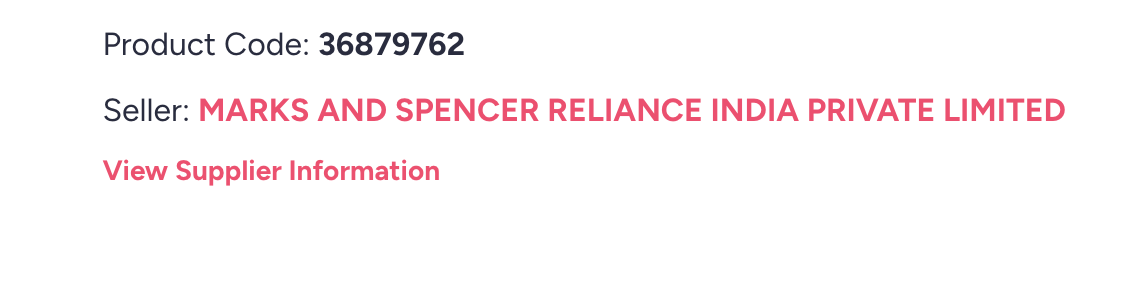
<p>So I started with Myntra products first. I inspected the product page on Myntra to see where the country-of-origin information is stored and what the manual process was to find it, such as scrolling down and clicking on <code class="language-plaintext highlighter-rouge">View Supplier Information</code>.</p>

<p align="center">
  <img src="/assets/images/initial-supplier-info.png" alt="View Supplier Information" />
</p>

<p>This opened a modal which had the country of origin information. So I had to make the extension do the same thing, click on the button and then extract the country information from the modal.</p>

<p align="center">
  <img src="/assets/images/country-of-origin.png" alt="Country of Origin" />
</p>

<p>Based on this, I found the div selector that contained the country information and passed it to Copilot as:</p>

<div class="language-plaintext highlighter-rouge"><div class="highlight"><pre class="highlight"><code>For myntra its not working.
The Country of Origin comes up as a &lt;div class="Modal-modalContent"&gt;&lt;div class="Modal-modalDialog"&gt;&lt;div class="details-details"&gt;&lt;span class="myntraweb-sprite Address-close-button sprites-remove"&gt;&lt;/span&gt;&lt;div&gt;&lt;h3&gt;More Information&lt;/h3&gt;&lt;p&gt;Product Code : 36879762&lt;/p&gt;&lt;/div&gt;&lt;ul&gt;&lt;li&gt;&lt;h4&gt;Importer Details&lt;/h4&gt;&lt;p&gt;Marks &amp; Spencer Reliance India Pvt Ltd Ground Floor Infinity Tower Cdlf Cyber City Phase Ii Gurgaon Haryana-122002&lt;/p&gt;&lt;/li&gt;&lt;li&gt;&lt;h4&gt;Country of Origin&lt;/h4&gt;&lt;p&gt;Bangladesh&lt;/p&gt;&lt;/li&gt;&lt;/ul&gt;&lt;/div&gt;&lt;/div&gt;&lt;/div&gt;

When we click on this div: class="supplier-viewmore-link" having text: View Supplier Information

#mountRoot &gt; div &gt; div:nth-child(1) &gt; main &gt; div.pdp-details.common-clearfix &gt; div.pdp-description-container &gt; div.undefined.supplier-desktopCodeSupplier &gt; div:nth-child(2) &gt; div

</code></pre></div></div>

<p>Now, when opening a product page on Myntra, the extension clicked the <code class="language-plaintext highlighter-rouge">View Supplier Information</code> button, extracted the country information from the modal, and showed it as a toast notification on the top right of the page.</p>

<p>But the issue here was that the modal opened, which was a bit annoying for the user. All of this had to happen in the background without opening the modal, so I had to find a way to extract the country information without showing it.</p>

<p>So this was the next prompt:</p>

<div class="language-plaintext highlighter-rouge"><div class="highlight"><pre class="highlight"><code>Okay, now it works, but the modal opens in the UI, which is a bad user experience. Is there any way to do it in the background?
</code></pre></div></div>

<p>Gist of the solution:</p>

<div class="language-plaintext highlighter-rouge"><div class="highlight"><pre class="highlight"><code>The supplier link is still clicked programmatically, but:
addMyntraModalStealthStyle() temporarily hides the modal (opacity: 0, no pointer events) while it’s open, so users should not see it.

openMyntraCountryModalIfNeeded() now:
Clicks the link once, waits ~900 ms, scans modal content via scanElements(getCurrentHostSelectors()), and returns the detected country.

Then calls closeMyntraModalIfOpen() to close/remove the modal and removeMyntraModalStealthStyle() to restore normal styles.

The run() function:
If initial selector scan finds nothing on Myntra, it calls this new “stealth” modal flow and uses the returned country.
</code></pre></div></div>

<p>This made it work as expected without opening the modal in the UI.</p>

<p align="center">
  <img src="/assets/images/country-toast.png" alt="Country of Origin" />
</p>

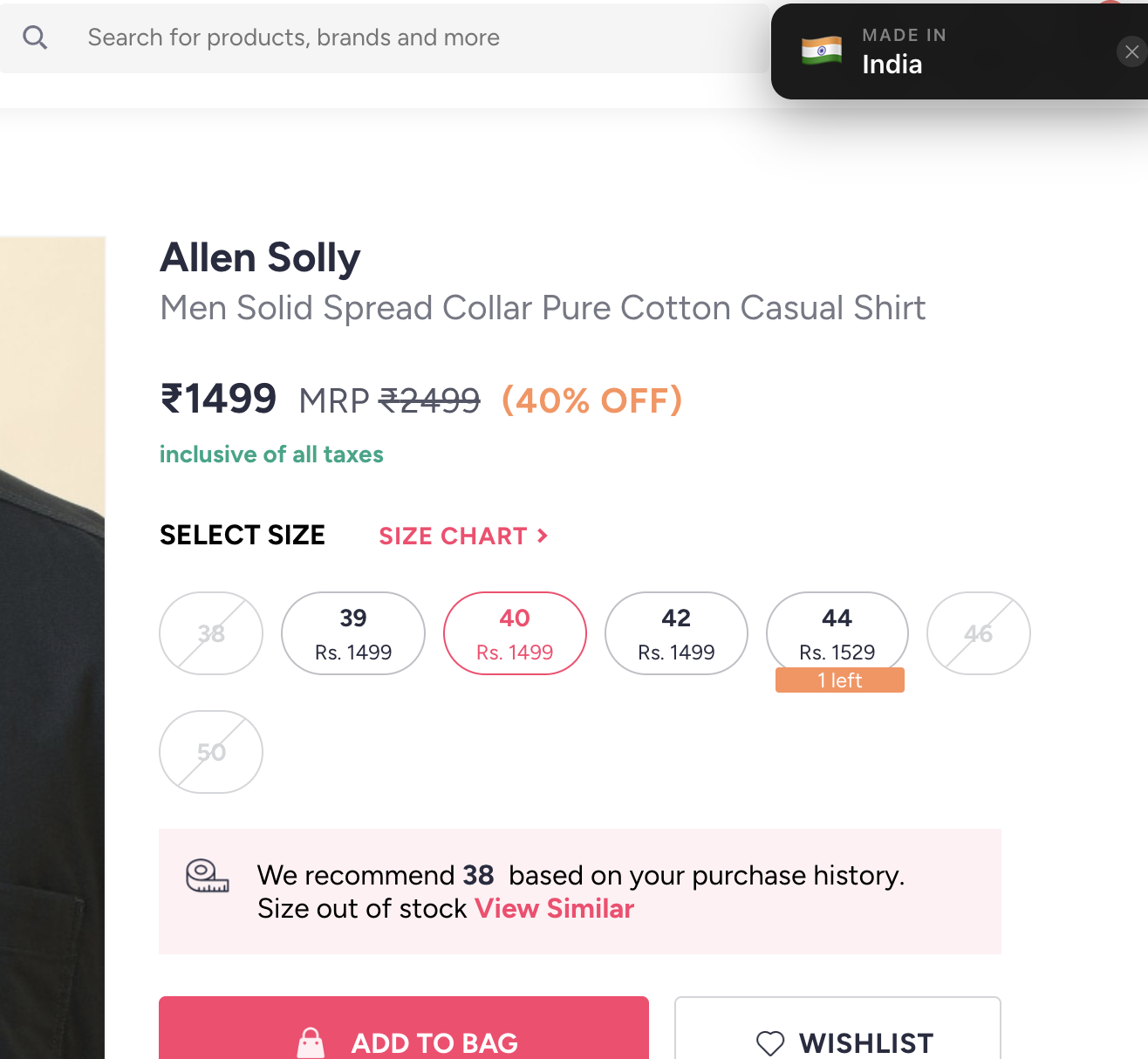
<p>While trying it in the UI, I found a case where, if the product size is not selected, the supplier information is not available.</p>

<p>Here was the prompt to fix it:</p>

<div class="language-plaintext highlighter-rouge"><div class="highlight"><pre class="highlight"><code>One behavior I observed is that when I open a product and have not selected a size, the supplier information is not present.

So now only trigger the flow when a size is selected from this div: #sizeButtonsContainer &gt; div.size-buttons-size-buttons
Then trigger our flow to find the country of origin, rather than triggering it as soon as the page opens.
</code></pre></div></div>

<p>This made the extension work only after a product size is selected, and then it shows the country of origin as a toast notification on the top right of the page.</p>

<p>The next step is to optimize it for other sites.</p>

<h3 id="summary">Summary</h3>

<p>Overall, getting started with boilerplate code from Claude and then using Copilot to understand and refine the code was a good experience. Obviously, you need to be specific with your prompts to get the desired output.</p>

<p>An idea turned into a product quickly with the help of AI tools. I hope this guide will be helpful for others who want to build similar extensions or products using AI tools.</p>]]></content><author><name></name></author><summary type="html"><![CDATA[About the Extension]]></summary></entry><entry><title type="html">Welcome!!</title><link href="https://shrikantj.dev/2026/02/04/welcome.html" rel="alternate" type="text/html" title="Welcome!!" /><published>2026-02-04T06:48:24+00:00</published><updated>2026-02-04T06:48:24+00:00</updated><id>https://shrikantj.dev/2026/02/04/welcome</id><content type="html" xml:base="https://shrikantj.dev/2026/02/04/welcome.html"><![CDATA[<p>Welcome to my blog! Here I would be documenting things I read: books, articles, concalls, annual reports, pdfs, etc. Things that I listen or watch: podcasts, youtube videos, etc. And also things that I do: projects, work, etc.</p>

<p>This is more like a personal journal, sharing my learnings, thoughts and observations. I hope that it will be useful for someone else as well. I will try to keep it updated regularly.</p>]]></content><author><name></name></author><summary type="html"><![CDATA[Welcome to my blog! Here I would be documenting things I read: books, articles, concalls, annual reports, pdfs, etc. Things that I listen or watch: podcasts, youtube videos, etc. And also things that I do: projects, work, etc.]]></summary></entry></feed>